
MLA Format Example: Research Paper Setup, Page by Page
Show contents
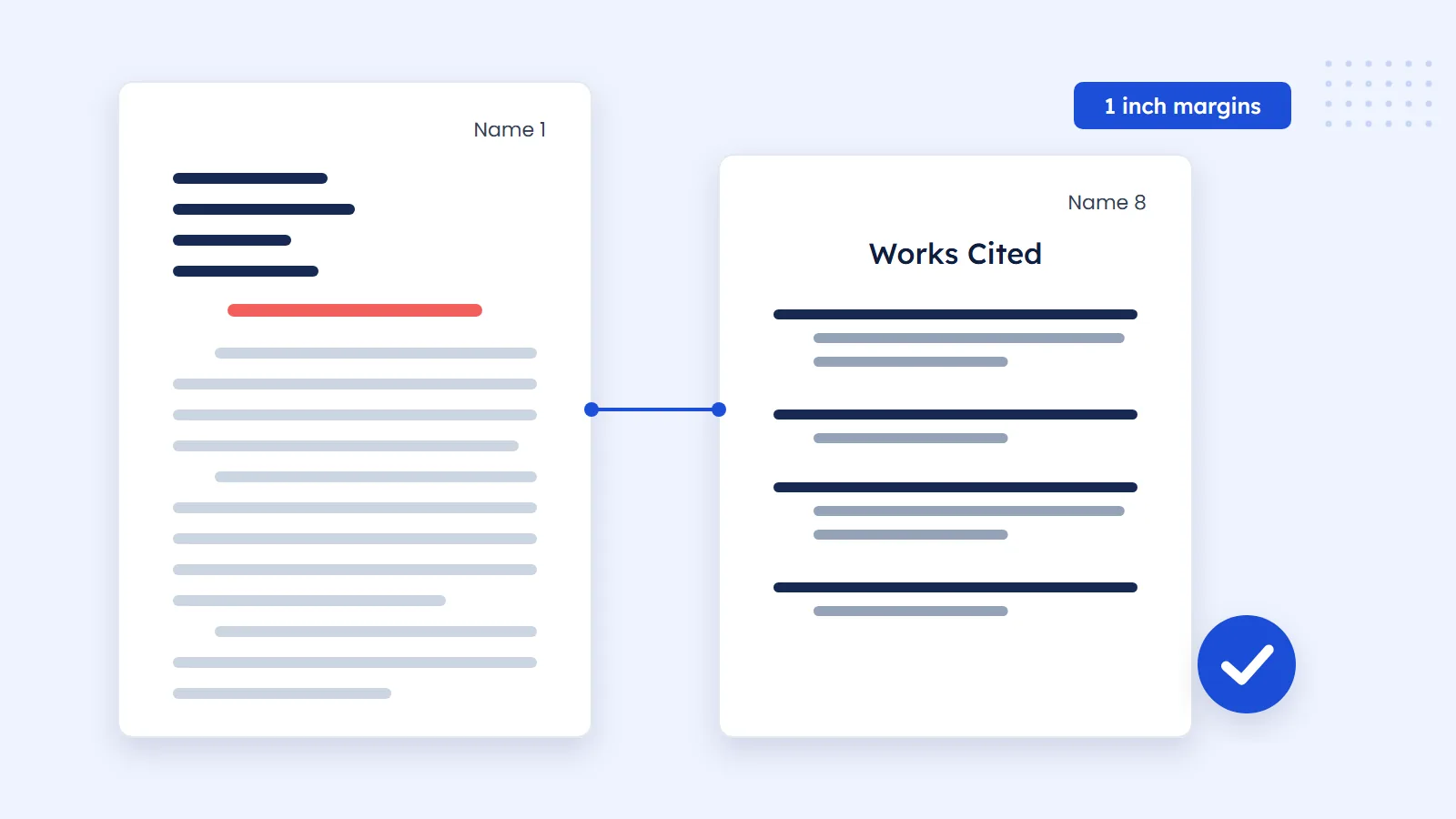
An MLA format example paper has one-inch margins, a readable 12-point font, double spacing throughout, your last name and the page number at the top right of every page, a four-line heading on the first page, a centered title, and a Works Cited list on its own page at the end. That is the whole layout. The rest of this guide shows each part on a sample page.
Rather than repeat rules second hand, we measured a real paper. The MLA Style Center publishes sample essays written by students, and we opened Chloe Wiitala's essay on Frankenstein and read the exact positions from the PDF. Where this guide gives a measurement, that is where it came from. Your instructor's instructions always come first, so check the assignment brief before you follow any general guide.
What MLA format looks like
MLA style comes from the Modern Language Association and is common in literature, language and humanities courses. A paper in MLA format has a plain look on purpose: there is no decoration, and nothing competes with your argument. The table below lists each setting and what we found in the published sample.
| Setting | What to use | Measured in the MLA sample |
|---|---|---|
| Paper size | US Letter, 8.5 by 11 inches, unless told otherwise | 612 by 792 points, which is 8.5 by 11 inches |
| Margins | One inch on all sides | Text starts 72 points (1 inch) from the left edge |
| Font | A readable font such as Times New Roman | 12 points throughout, including the heading |
| Line spacing | Double, everywhere | About 27.5 points between lines, in the works-cited list too |
| Paragraph indent | Half an inch on the first line | 36 points (0.5 inch) from the margin |
| Header | Last name and page number, top right | "Wiitala 1", aligned to the right margin, above the text area |
| Works Cited indent | Hanging indent of half an inch | Second lines start 36 points in from the margin |
Treat these as the default for a class paper. A journal, a thesis office or a department handbook may ask for something else, and their rule wins for that document. If a brief says nothing at all about layout, these settings are the safe choice.
The written rules match these numbers. The EasyBib MLA format guide lists one-inch margins, a 12-point easy-to-read font, double spacing for the whole paper including the Works Cited page, and a half-inch first-line indent. The sample shows those rules in practice, which is more useful than a list on its own.
MLA format example: the first page
The first page does the most work, so it is where most marks get lost. Here is a page set up with the same layout as the MLA sample. The name, the course and the paragraph text are invented to show the layout.
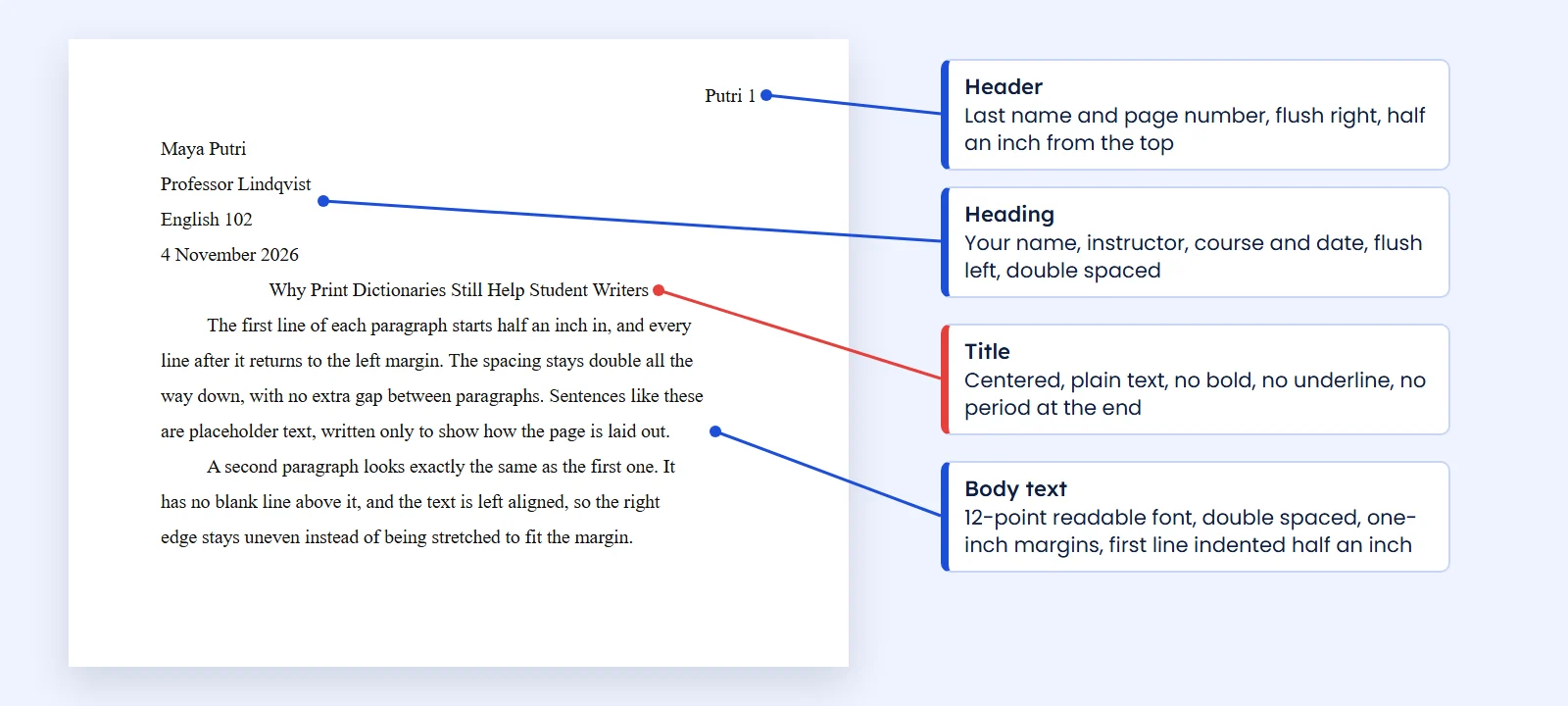
Reading from the top, the page has four parts:
- The header. Your last name, a space and the page number, aligned right.
- The heading. Four lines at the left margin: your full name, your instructor's name, the course, and the date. In the MLA sample the date reads 6 December 2023, with the day first and the month written out.
- The title. Centered on the line after the date, with no extra space above or below it.
- The text. It begins on the very next line, with a half-inch indent.
The course line is flexible. Across the three MLA samples we opened, it reads Methods of Literary Study, US History and English 5, so a course name or a course code both appear. The dates follow one pattern in all three: day, month, year, with the month spelled out, as in 2 May 2023.
There is no title page in that sample. All three MLA sample essays we opened start on page one with this heading. EasyBib notes that MLA has no official title page or cover page guidelines, so only add one if your instructor asks for it, and then ask what should be on it.
Header, heading and title rules
These three items look simple, and small slips in them are easy to spot.
The running header
Every page carries your last name and the page number, including page one and the Works Cited page. In the sample, the last page reads "Wiitala 10". Do not type it by hand on each page. Use your word processor's header so the number updates by itself, and do not add "p." or "page" in front of the number.
The four-line heading
The heading appears once, on page one only. Keep it double spaced like everything else, and resist the urge to tighten it. If you are working in a group, ask your instructor how to list the names.
The title
Use title case and plain text. EasyBib's guide says not to underline it, bold it or type it in all capitals, and not to end it with a period. The only italics belong to titles of other works. That is why, in the sample, the word Frankenstein is italic inside the essay's own title while the rest of the line is not.
A long title can run onto a second line, as it does in the sample. Keep both lines centered and double spaced.
Body text, quotations and figures
From the first paragraph to the last, the body follows the same pattern: double spaced, left aligned, with a half-inch indent on each new paragraph and no blank line between paragraphs. If your word processor adds extra space after paragraphs, switch it off, because this is one of the most common ways a paper ends up looking wrong.
Every source you use needs a short citation in the sentence, usually the author's name and a page number in parentheses. Our guide to MLA in-text citation covers those in detail, including short quotations and block quotations. If you are putting a source's idea into your own words, it still needs a citation, and how to paraphrase shows how to do that without staying too close to the original. The difference between paraphrasing and summarizing matters here too.
Images in an MLA paper are labeled in the text. The MLA sample essay by Catherine Mao places a picture on page 5 with a caption that begins "Fig. 1." followed by the artist and the title. You can use it as a model if your paper includes artwork, a photo or a chart.
If you are comparing styles for a class, the page setup is where they differ most from the start. APA format has its own title page rules, and Harvard referencing changes the citations and the list at the end. Do not mix them in one paper.
MLA reference example: the Works Cited page
The list of sources starts on a new page after your last paragraph. In the sample, the words Works Cited are centered in plain text at the top of the page, and the running header continues as usual.
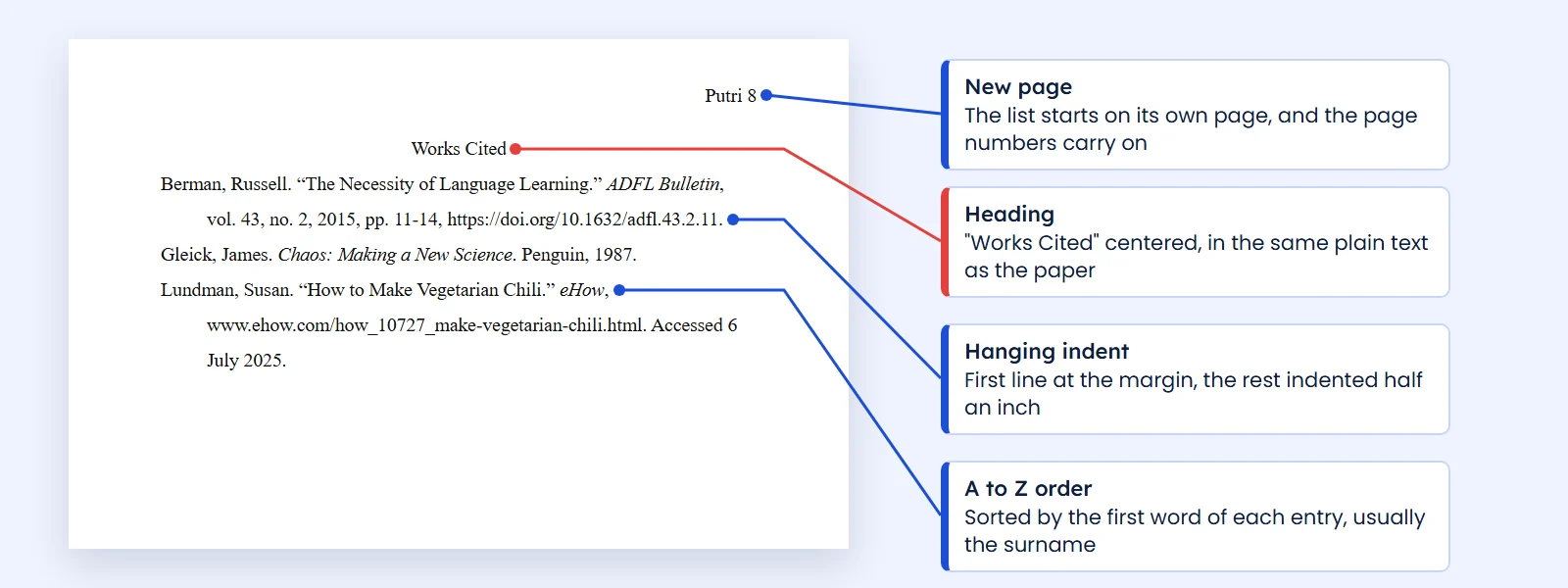
Each entry has a hanging indent: the first line starts at the margin and any further lines move in half an inch. Entries are sorted alphabetically by the first word, which is usually the author's surname. Each one is built from what the MLA calls core elements, assembled in a fixed order. Only list sources you actually cited in the paper. A list of everything you read is a different document, and an annotated bibliography is the version that adds notes to each source.
| Source | Works Cited entry | In-text citation |
|---|---|---|
| Book | Gleick, James. Chaos: Making a New Science. Penguin, 1987. | (Gleick) |
| Journal article | Berman, Russell. "The Necessity of Language Learning." ADFL Bulletin, vol. 43, no. 2, 2015, pp. 11-14, https://doi.org/10.1632/adfl.43.2.11. | (Berman) |
| Web page | Lundman, Susan. "How to Make Vegetarian Chili." eHow, www.ehow.com/how_10727_make-vegetarian-chili.html. Accessed 6 July 2025. | (Lundman) |
Notice the pattern. Titles of whole works, such as a book or a journal, are italic. Titles of parts, such as an article or a page, go in quotation marks. Add a page number to the in-text citation when you quote or point to a specific passage in a source that has page numbers. MLA's page of citations by format has more source types, and our book, journal article and website pages walk through each one.
MLA outline format
Many students search for an MLA outline, so it helps to know what it is. An outline is a planning tool, and none of the three MLA sample essays we opened includes one. Unless your instructor asks you to hand it in, it stays in your notes.
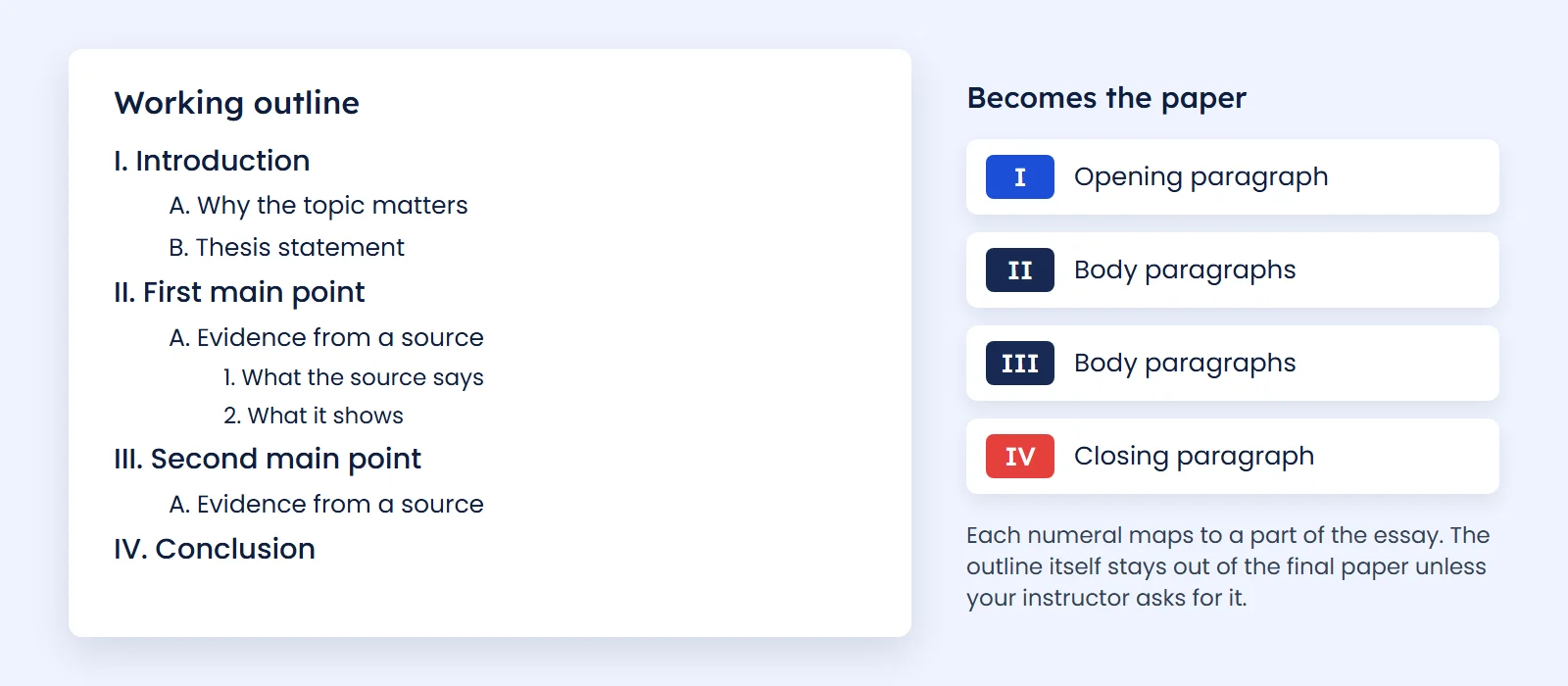
If you do have to submit one, use the pattern your instructor gives you. The usual layout steps down from Roman numerals to capital letters to numbers, as in the picture. Keep each line short, and make sure every main point has evidence listed under it. A point with nothing beneath it usually means you need one more source before you start drafting.
Set up an MLA format template in Word or Google Docs
You only need to do this once. Save the finished file as your MLA template, then make a copy for each new paper.
- Margins. In Word, open Layout, then Margins, and pick one inch on all sides. In Google Docs, open File, then Page setup.
- Font. Select a readable font such as Times New Roman at 12 points.
- Spacing. Set line spacing to double and remove any space before or after paragraphs.
- Header. Insert page numbers at the top right, then type your last name and a space in front of the number.
- Heading and title. Type the four heading lines at the left margin, then center the title.
- Paragraph indent. Press Tab at the start of each paragraph, or set a half-inch first-line indent.
- Works Cited. Insert a page break, center the words Works Cited, and set a hanging indent of half an inch for the entries.
Some word processors offer a ready-made MLA template. They can save time, but check the result against the table at the top of this guide, because built-in spacing and heading styles are not always what your instructor expects.
Build your citations faster
The layout takes minutes. The Works Cited entries are where the time goes, especially when you have many sources. The free MLA citation generator builds an entry from a DOI, a web address or an ISBN, and shows the matching in-text citation.

Treat any generated entry as a draft. Compare it with the source before you paste it in, because databases sometimes hold incomplete details. In the screenshot, for example, the tool prints the page range as 207-17 in the style it generates, so check how your instructor wants page ranges written. Our citation generator handles other styles if a class asks for something else, and in-text citation explains how citations work across styles.
Common MLA format mistakes
- Extra space between paragraphs. Word's default paragraph spacing often adds it. Turn it off.
- A bold or underlined title. The title stays in plain text.
- A heading on every page. The four-line heading is for page one. Later pages only have the running header.
- Single-spaced Works Cited. The list is double spaced like the rest of the paper.
- Missing hanging indent. Entries with every line flush left are harder to scan.
- Sources in the wrong order. Sort alphabetically, not by the order they appear in your paper.
- A citation with no matching entry. Every source cited in your text needs an entry on the list, and every entry needs a citation in your text.
- A title page nobody asked for. The MLA sample essays do not use one.
Before you submit, print or preview one page and hold it next to the sample first page above. If the header, heading, title and first paragraph line up the same way, the rest of the paper is usually right too.
Frequently asked questions
What does an MLA format example look like?
It has one-inch margins, a readable 12-point font and double spacing throughout. Your last name and the page number sit at the top right, a four-line heading starts page one, the title is centered, and a Works Cited page closes the paper.
Does an MLA paper need a title page?
Usually not. The MLA sample essays start with a four-line heading on page one, and EasyBib notes that MLA has no official title page guidelines. Add one only if your instructor asks for it, and ask what it should include.
What goes in the MLA heading?
Four lines at the left margin of page one: your full name, your instructor's name, the course, and the date. Keep them double spaced. In the MLA sample the date is written day first, as in 6 December 2023.
Is the Works Cited page double spaced?
Yes. In the MLA sample essay the Works Cited page uses the same double spacing as the rest of the paper, with no extra blank lines between entries.
How do I make a hanging indent in MLA format?
Select your entries, open the paragraph or indentation settings in your word processor, and choose a hanging indent of half an inch. The first line stays at the margin and later lines move in.
What font should I use for MLA format?
Use a readable font such as Times New Roman at 12 points. The MLA sample essay uses 12 points throughout, including the heading and the Works Cited page.
Does an MLA research paper need an outline?
Only if your instructor asks for one. An outline is a planning tool, and the three MLA sample essays we opened do not include one. If you must submit it, follow the pattern your instructor gives you.
Where can I see a real MLA paper example?
The MLA Style Center publishes sample essays by students on its Sample Essays page, as PDF files. They are the most reliable models, because they come from the organization that writes the style.
Sources
- MLA Style Center: Sample Essays: Writing with MLA Style
- MLA Style Center: Sample essay by Chloe Wiitala (PDF)
- MLA Style Center: Sample essay by Catherine Mao (PDF)
- MLA Style Center: Works Cited: A Quick Guide
- MLA Style Center: Citations by Format
- MLA Style Center: Page range and DOI
- EasyBib: MLA Format Guide