
APA Title Page: Student and Professional Format (7th Edition)
Show contents
- What an APA Title Page Includes
- Student APA Title Page Format, Element by Element
- Professional Title Page and Running Head
- The Author Note: Who Needs One
- APA Cover Page Formatting: Font, Spacing and Margins
- APA Title Page Template: A Line-by-Line Layout
- Common APA Title Page Mistakes
- APA vs MLA Title Page
- After the Title Page: References and Citations
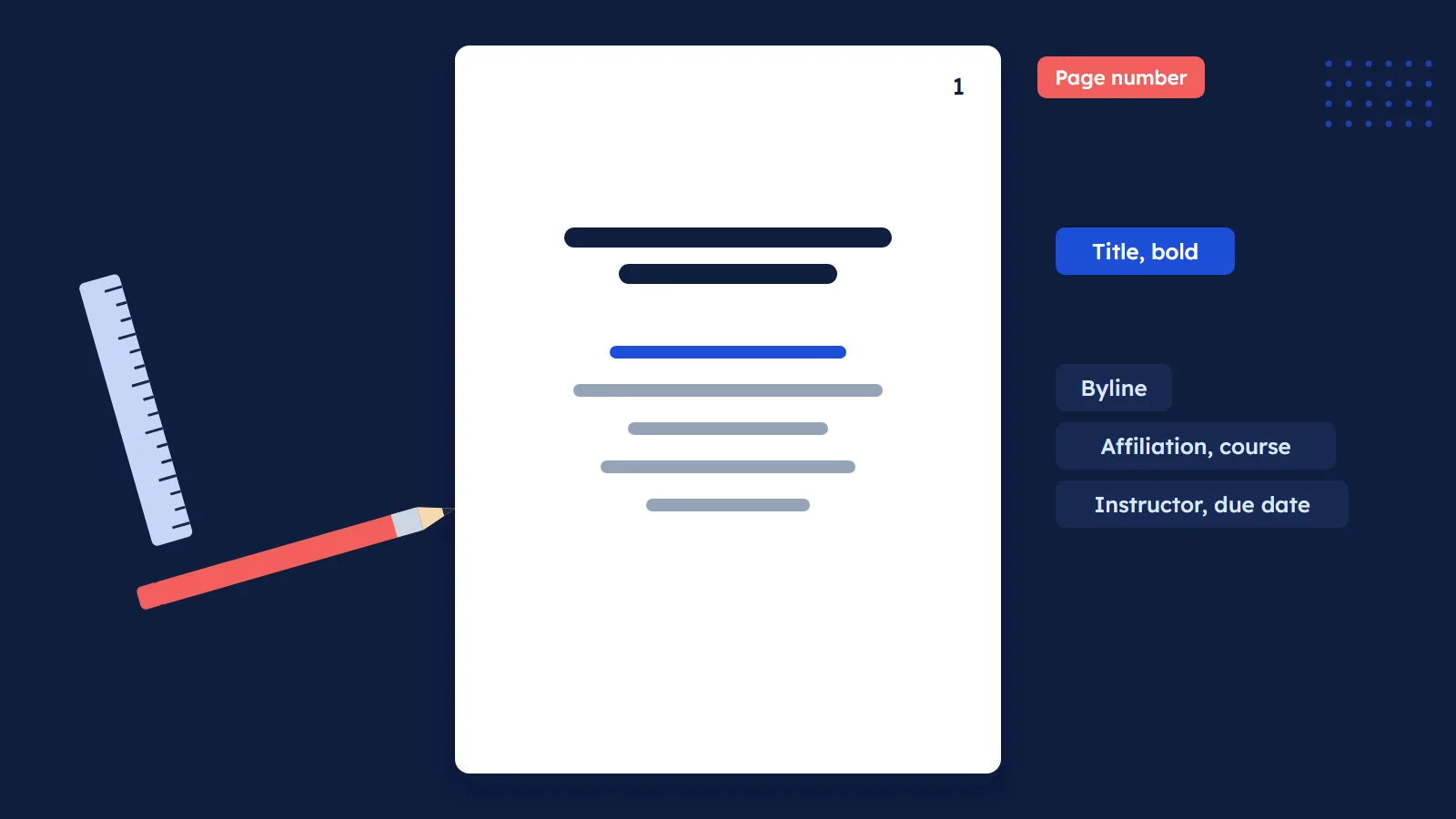
An APA title page is the first page of every APA Style paper, and in the 7th edition it comes in two versions: a student title page and a professional title page. The student version lists the paper title, author names, affiliation, course number and name, instructor name, due date and page number. The professional version swaps the course details for an author note and adds a running head.
That is the short answer. The rest of this guide walks through each element in the order it appears, shows a line-by-line layout you can rebuild in any word processor, and lists the mistakes that cost students easy formatting points. Every rule below comes from the official APA Style title page guidelines, which cover Section 2.3 of the Publication Manual (7th ed.).
What an APA Title Page Includes
APA is direct about it: "A title page is required for all APA Style papers." So unlike MLA, there is no debate about whether you need one. The only question is which version to use.
APA's answer is also simple. Students use the student title page unless their instructor or institution asks for the professional one. Authors submitting a manuscript to a journal use the professional version.
Here is the quick comparison before we go element by element.
| Element | Student title page | Professional title page |
|---|---|---|
| Paper title (bold, centered) | Yes | Yes |
| Author names (byline) | Yes | Yes |
| Author affiliation | Your school and department | Where the research was done |
| Course number and name | Yes | No |
| Instructor name | Yes | No |
| Assignment due date | Yes | No |
| Author note | Not usually | Always, for journal submissions |
| Running head | Only if your instructor asks | Yes, on every page |
| Page number 1, top right | Yes | Yes |
In our view, the table explains most of the confusion online. Many older templates still show a running head on student papers because that was the 6th edition rule. APA itself notes the title page guidance "has been revised from the 6th edition," so a template from before 2019 is a risky starting point.
Student APA Title Page Format, Element by Element
The student version is what most readers of this guide need. APA lists its elements in a fixed order, top to bottom, all centered except the page number.
- Paper title. Place it three to four lines down from the top of the page. Center it, make it bold, and capitalize major words. A subtitle can go on its own double-spaced line. APA sets no maximum length, but asks you to keep the title focused and include key terms.
- Author names. Leave one double-spaced blank line after the title, then center the names on their own line. Two authors are joined by "and". Three or more get commas, with "and" before the last name.
- Author affiliation. For students, this is the school you attend. Give the department and the institution, separated by a comma, for example "Department of Psychology, University of Georgia" (APA's own example).
- Course number and name. Write the course number as it appears on your course materials, then a colon and the course name, such as "PSY 201: Introduction to Psychology".
- Instructor name. Use the form shown on your course materials, for example "Dr. Rowan J. Estes".
- Assignment due date. Use the date format common in your country. APA shows both "October 18, 2020" and "18 October 2020" as valid.
- Page number. The title page is page 1. Insert it with your word processor's automatic page numbering in the top right corner of the page header.
Each of these elements sits on the next double-spaced line after the one before it. The only extra gap is the single blank double-spaced line between the title and the byline.
Tip: Copy the course code, instructor name and due date straight from your syllabus. APA asks for the course number "as shown on instructional materials," so "PSY 201" on the syllabus should not become "Psych 201" on your title page.
Professional Title Page and Running Head
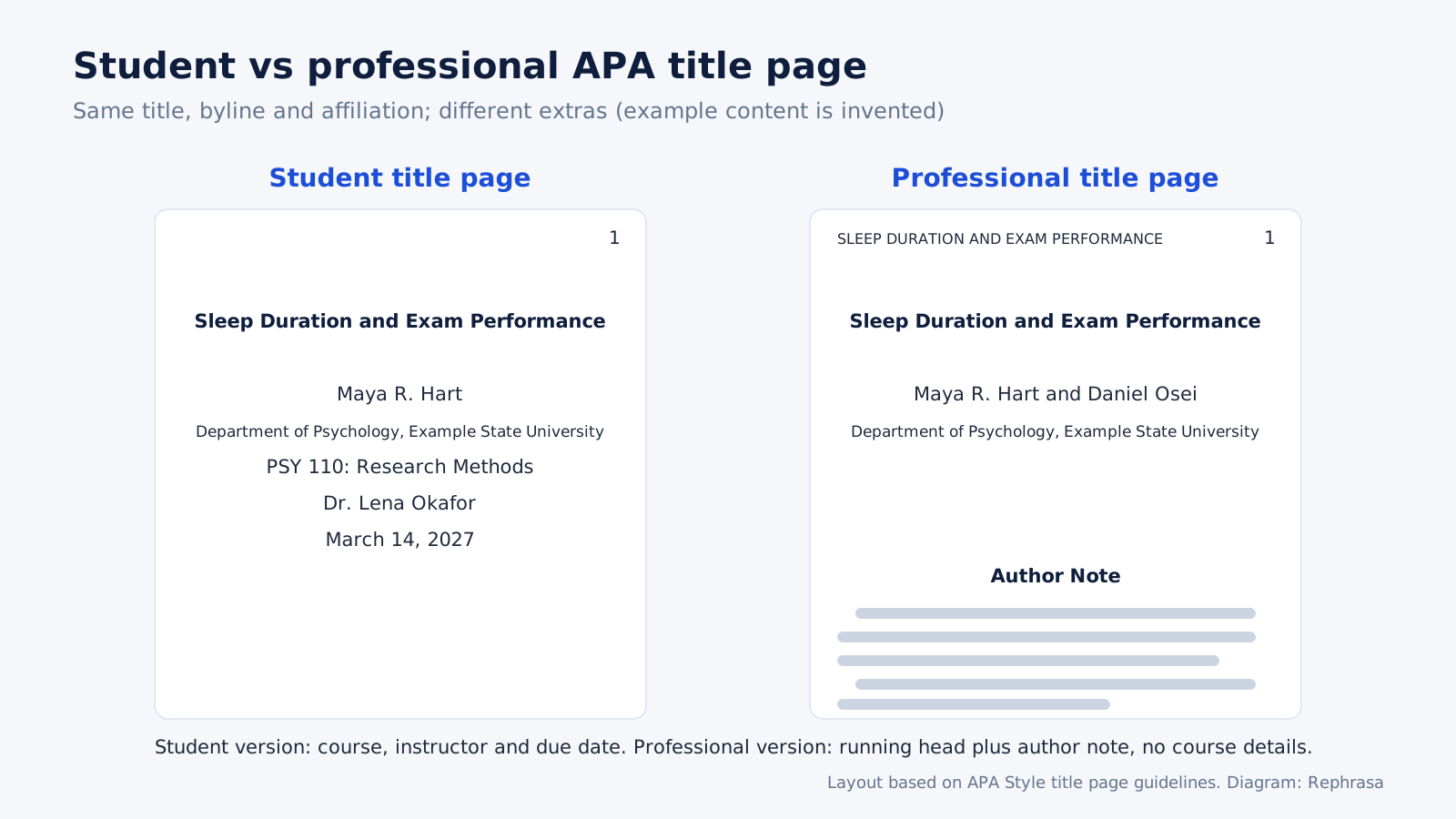
The professional title page keeps the title, byline, affiliation and page number, then adds two elements: an author note and a running head. It drops the course, instructor and due date lines.
Bylines with several affiliations
For a professional paper, the affiliation is the institution where the research was conducted. When authors have different affiliations, APA uses superscript numerals after each author name and before each matching affiliation. If every author shares the same affiliation, you leave the numerals out. Each affiliation goes on its own centered line.
Running head rules
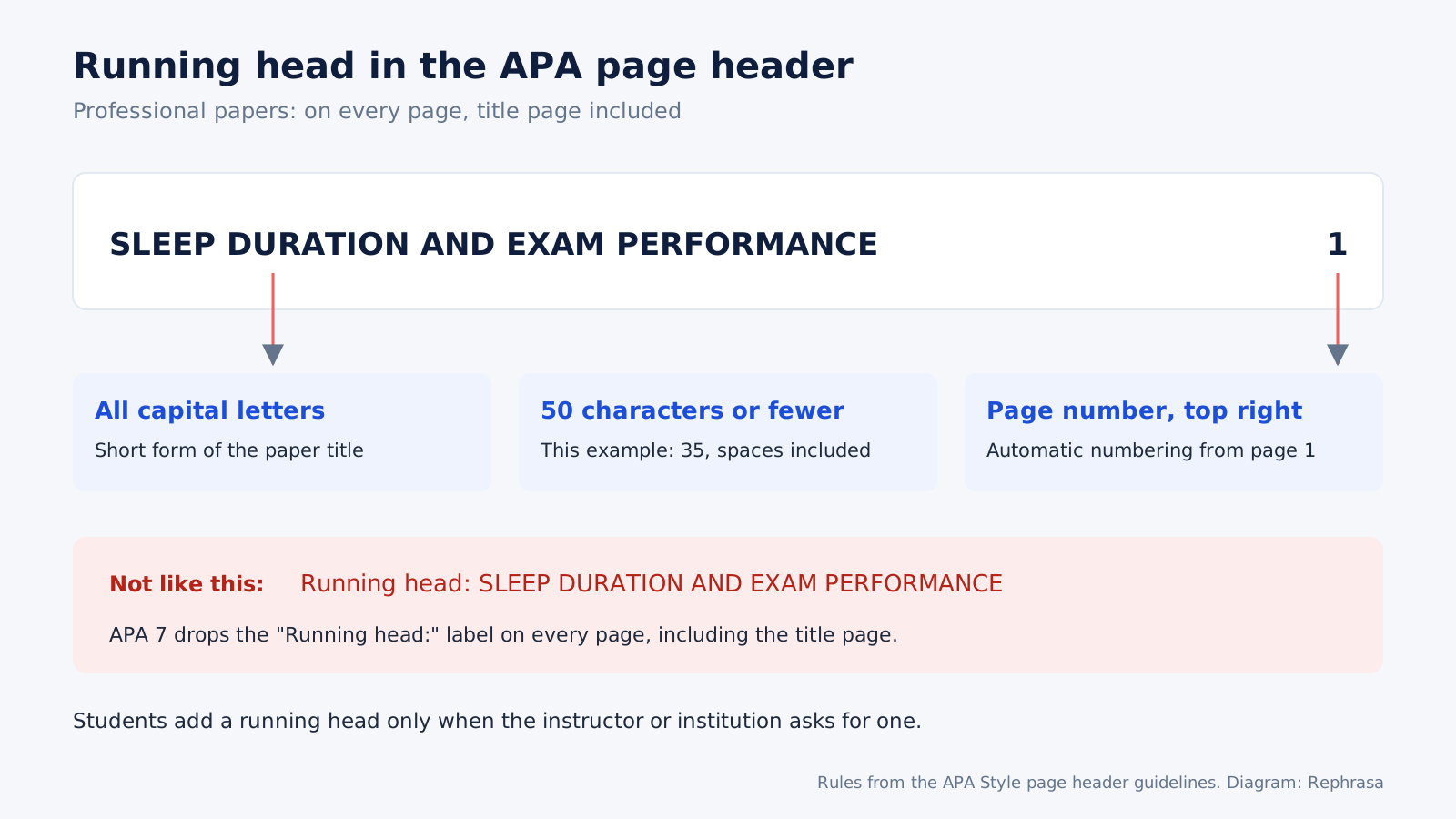
The running head is a shortened version of your title that appears in the page header of every page, including the title page. According to APA's page header guidelines, it must follow these rules:
- All capital letters.
- No more than 50 characters, counting spaces and punctuation.
- No abbreviations, although "&" may replace "and".
- Aligned to the left margin, across from the page number on the right.
- No "Running head:" label in front of it, on any page.
For example, a paper titled "Sleep Duration and Exam Performance: A Longitudinal Study of First-Year Students" could use the running head SLEEP DURATION AND EXAM PERFORMANCE, which is 35 characters. If your title is already short, the running head can simply be the full title.
Students: you only add a running head when your instructor or institution requires one. If they do, APA's blog post on running heads for student papers says to follow the professional rules above.
The Author Note: Who Needs One
An author note gives readers extra information about the authors and the research. APA's author note guidance is clear on who needs it: "Professional papers intended for submission to a journal must always include an author note. Student papers do not typically include an author note." A student working on a collaborative project, or one whose instructor asks for it, should include one.
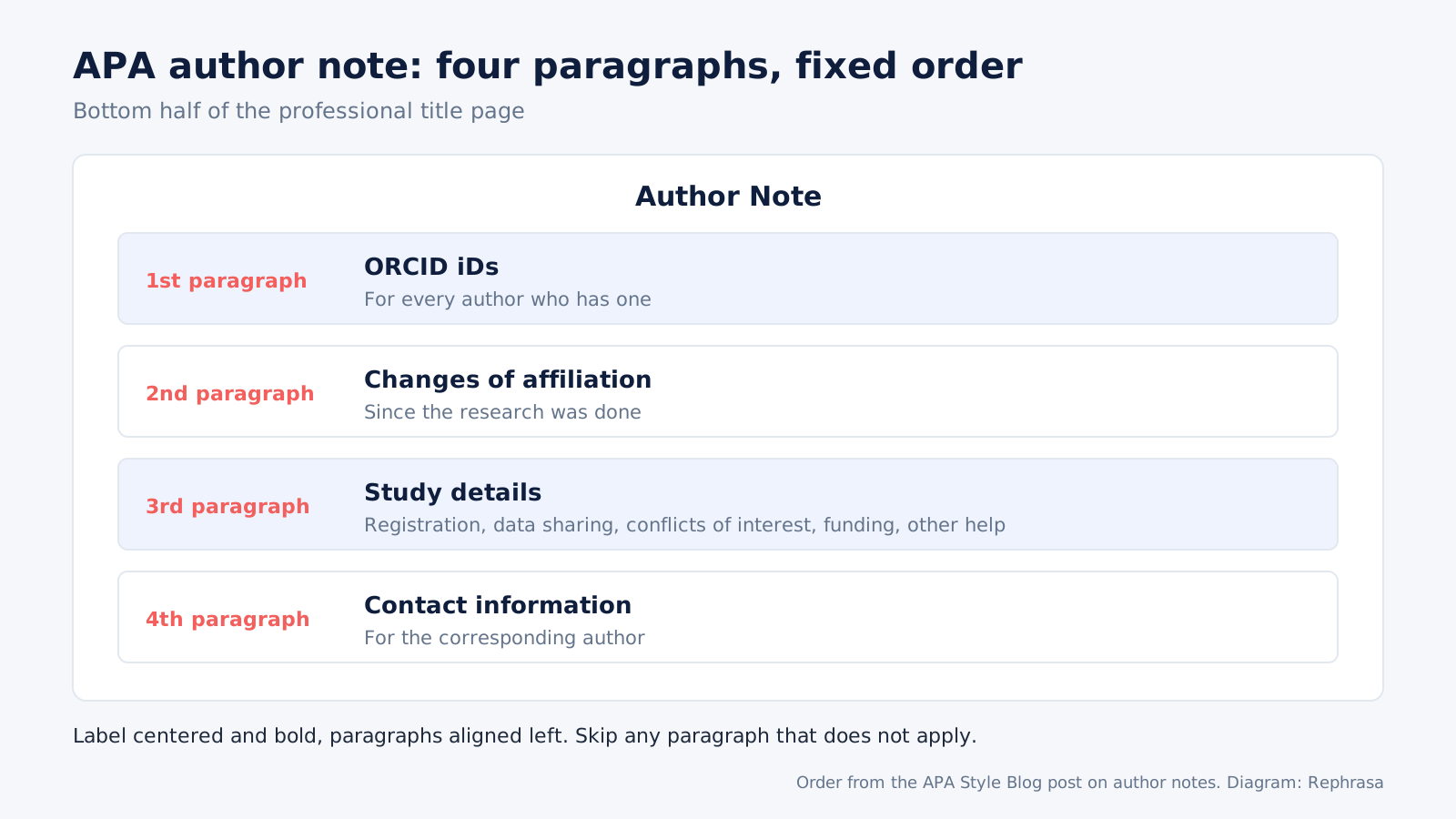
On the page, the author note goes in the bottom half of the title page. The label "Author Note" is centered and bold, and the paragraphs below it are aligned left. The line spacing guidance adds that a professional paper needs at least one double-spaced blank line above the author note.
The note itself runs in up to four paragraphs, in this order:
- ORCID iDs for any author who has one.
- Changes of affiliation since the research was done.
- Study details: registration, data sharing, conflicts of interest, funding and other help.
- Contact information for the corresponding author.
Leave out any paragraph that does not apply. Journals outside APA may have their own author note rules, so check the journal's instructions before you submit.
APA Cover Page Formatting: Font, Spacing and Margins
The title page, which many people call the APA cover page or front page, uses the same base settings as the rest of the paper. Getting these right takes about two minutes in Word or Google Docs.
- Margins: 1 inch on every side, per APA's margin guidelines. A thesis or dissertation may follow different rules set by your institution.
- Font: APA accepts several legible fonts, including 12-point Aptos, 11-point Calibri, 11-point Arial, 12-point Times New Roman and 11-point Georgia (APA font page). Use the same font on the title page as in the body.
- Line spacing: double-space the whole title page. The only additions are the blank double-spaced line between the title and the byline and, for professional papers, the blank line above the author note (APA line spacing page).
- Page number: automatic numbering, top right, starting at 1 on the title page.
APA heading vs page header
People searching for "APA heading" usually mean one of two different things. The page header is the strip inside the top margin: just the page number for students, and the page number plus running head for professionals. Headings are the section titles inside the paper. APA has five levels, and Level 1 is centered, bold and in title case. Neither one belongs on the title page as a label, so do not type the word "Title Page" or "Heading" at the top.
Unlike MLA, APA has no name-and-date heading block in the upper left of the first page. That information already lives on the title page.
APA Title Page Template: A Line-by-Line Layout
You do not need to download a file to get a correct APA title page template. Set the page up once using the layout below, then save it as your own starting document. The sample content is invented for illustration.
| Position on the page | Alignment and style | Example content |
|---|---|---|
| Page header | Right aligned | 1 |
| Lines 1 to 3 | Empty, double-spaced | (blank) |
| Line 4 | Centered, bold, title case | Sleep Duration and Exam Performance in First-Year Students |
| Next line | Blank double-spaced line | (blank) |
| Next line | Centered | Maya R. Hart |
| Next line | Centered | Department of Psychology, Example State University |
| Next line | Centered | PSY 110: Research Methods |
| Next line | Centered | Dr. Lena Okafor |
| Next line | Centered | March 14, 2027 |
For a professional version, delete the course, instructor and date lines, add the running head to the left side of the page header, and place the bold, centered "Author Note" label in the bottom half of the page.
If you prefer an official file, APA publishes annotated student and professional sample papers in PDF and Word formats on its site. We think the annotated PDF is the better study tool, because the margin notes point to the exact manual section behind each rule.
Common APA Title Page Mistakes
Most errors come from mixing 6th edition habits with 7th edition rules. These are the ones worth checking before you submit:
- Adding "Running head:" in front of the running head. APA 7 says not to use this label on any page, including the first.
- Putting a running head on a student paper that nobody asked for. APA does not require one for students, and it usually means the template is out of date.
- Forgetting the bold title. The paper title is bold. On professional papers the "Author Note" label is bold too; the byline, affiliation and course lines are plain text.
- Placing the title in the vertical middle of the page. APA puts it three to four lines from the top.
- Extra blank lines between the byline, affiliation, course and date. Only the gap after the title is a blank line.
- Superscript numbers when everyone shares one affiliation. Use them only when affiliations differ.
- Typing the page number by hand. Use automatic numbering so every page stays correct after edits.
- A running head over 50 characters. Count spaces and punctuation too.
One honest caveat: your instructor's rubric outranks any general guide, including this one. APA itself says instructors and institutions can ask for the professional format or a running head, so read the assignment sheet first.
APA vs MLA Title Page
If you switch between courses, the two styles are easy to confuse. MLA works almost the other way around. According to the MLA Style Center's guide to formatting a research paper, "A research paper does not normally need a title page." Instead, MLA puts a heading in the upper left of page 1 and centers the title below it.
| Question | APA 7 | MLA |
|---|---|---|
| Is a title page required? | Yes, for all papers | Not normally; used for group projects or when the teacher requires one |
| Where do name, course and date go? | Centered on the title page | Upper left of page 1, on separate double-spaced lines |
| Is the title bold? | Yes | No: not bold, italic, underlined or all caps |
| Is the title page numbered? | Yes, page 1 | No; the first page of the essay is page 1 |
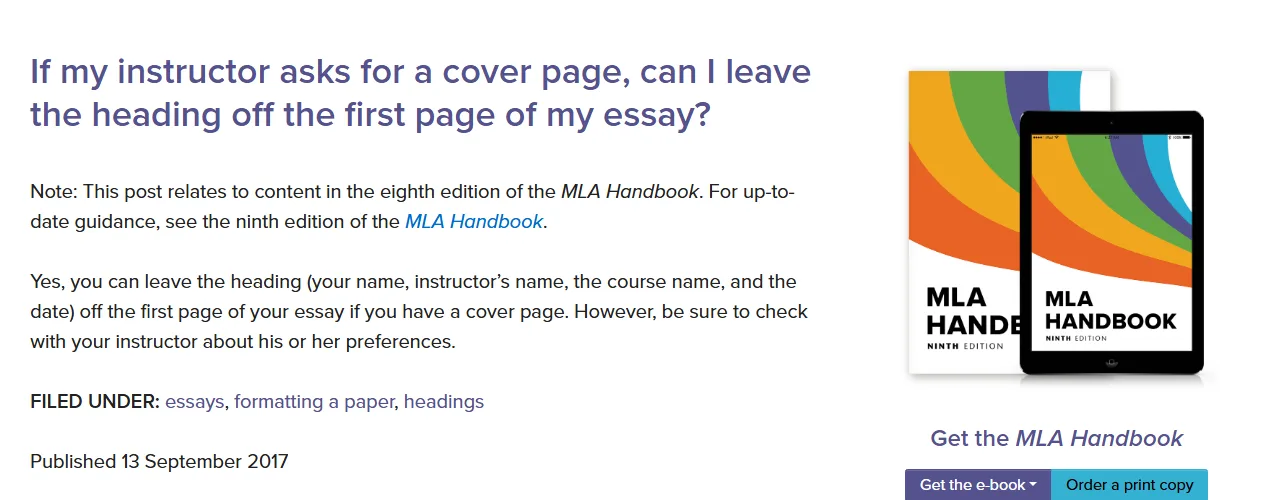
When an MLA instructor does ask for a cover page, the MLA Style Center says you can leave the heading off the first page, after checking your instructor's preference. Its answer on page numbering adds that the title page itself is not numbered. If you also need MLA references, the MLA citation generator formats works cited entries in the 9th edition.
After the Title Page: References and Citations
An APA title page carries no citations, so there is nothing to cite on it. The work starts on the next pages, where every quote and every paraphrase needs an in-text citation and a matching reference list entry. Paraphrasing a source in your own words still requires a citation.
For the full paper setup, including headings, in-text citations and the reference list, read our complete APA 7 format guide. To get the author-date rules right inside your paragraphs, see APA in-text citation rules and examples.
When you reach the reference list, the free APA citation generator builds APA 7 references from a DOI, URL or ISBN in your browser, and you can edit every field before adding it. Working in more than one style? The main citation generator also covers MLA, Chicago, Harvard, IEEE and AMA. Check each entry against your source before you submit, since a tool can only format the details it is given.
Frequently asked questions
Does a student paper need a title page in APA 7?
Yes. APA says a title page is required for all APA Style papers. Students use the student version, which lists the title, author names, affiliation, course number and name, instructor name, due date and page number, unless the instructor asks for the professional version.
Do I need a running head on my APA student paper?
Only if your instructor or institution asks for one. APA 7 requires running heads for professional papers. If you do add one, write it in all capital letters, keep it to 50 characters or fewer, align it left in the page header and do not type the label "Running head:".
Is the title bold on an APA title page?
Yes. In APA 7 the paper title is centered, bold and in title case, placed three to four lines down from the top of the page. The author names, affiliation and course details below it are not bold.
What is the difference between an APA cover page and a title page?
They are the same page. APA calls it the title page, while many students and instructors call it a cover page or front page. The formatting rules are identical.
Where does the author note go on an APA title page?
In the bottom half of the professional title page, under the centered, bold label "Author Note", with left-aligned paragraphs. Student papers do not usually include an author note unless the instructor asks for one.
Does an MLA paper need a title page?
Not normally. The MLA Style Center says a research paper does not normally need a title page; MLA uses a heading in the upper left of page 1 instead. A title page is used for group projects or when the teacher requires one, and it is not numbered.
What font and line spacing should an APA title page use?
The same settings as the rest of the paper: 1-inch margins, one legible font such as 12-point Times New Roman, 11-point Calibri or 11-point Arial, and double spacing throughout. Use automatic page numbering so the title page shows page 1 in the top right corner.
Which date format goes on an APA student title page?
Use the date format that is common in your country. APA shows both October 18, 2020 and 18 October 2020 as acceptable forms for the assignment due date.
Sources
- APA Style: Title page setup
- APA Style: Page header
- APA Style Blog: Running head or no running head?
- APA Style Blog: Who needs an author note? You ... maybe
- APA Style: Line spacing
- APA Style: Margins
- APA Style: Font
- APA Style: Headings
- APA Style: Sample papers
- MLA Style Center: Formatting a Research Paper (PDF)
- MLA Style Center: If my instructor asks for a cover page, can I leave the heading off the first page of my essay?
- MLA Style Center: Is the page after the title page of an essay numbered 1 or 2?